Building a production-ready MVP for both Android and iOS typically means choosing between speed, quality, and cost, and accepting that you can only have two. On a recent mobile MVP development project, I tested whether AI-assisted development could break that constraint. The result was a full-stack Kotlin application (backend, Android, and iOS) delivered in three months instead of the estimated six, without compromising on production readiness.
In this article, I’ll walk you through the specific decisions, tools, and workflow adjustments that made that possible.
The architectural decision that accelerated AI development for me
The first decision I made was about consolidating the technology stack.
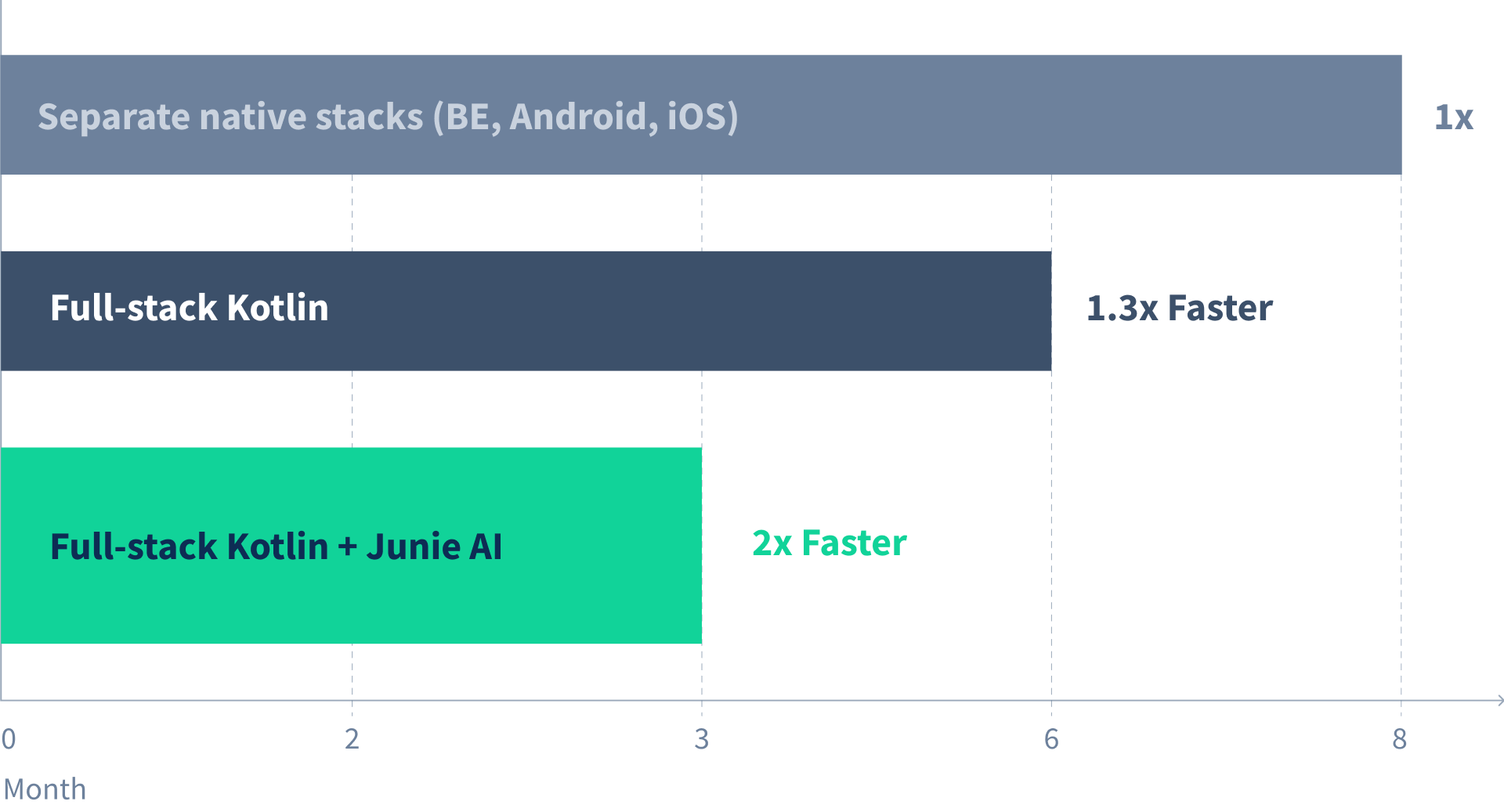
A traditional approach to cross-platform mobile development means maintaining three separate codebases: backend services, Android, and iOS. Based on my experience with similar projects, this approach would take roughly 8 months for a solo developer. Each platform has its own idioms, dependency management, and debugging workflows, and context-switching between them adds significant overhead.
By committing to full-stack Kotlin (using Compose Multiplatform for mobile and Kotlin for the backend), I reduced that estimate to six months. The entire codebase shares one language, one set of patterns, and one mental model. This decision created the conditions that made AI-assisted development effective. A unified cross-platform mobile codebase means the AI agent can understand and modify code across the entire project without translation overhead.
The Kotlin Multiplatform ecosystem is still maturing, and some libraries lack the polish of their native equivalents. But for MVP development, where speed to validation matters more than platform-specific optimizations, the trade-off was worth it.
Why I chose Junie as the AI coding agent
With the architecture decided, I needed an AI agent that could work within my existing development environment and coding standards. After evaluating several options, I selected JetBrains' Junie for three reasons:

1. Full project context
Junie has native access to the entire project through deep integration with IntelliJ IDEA. It can see all files, understand the dependency graph, and make coordinated changes across multiple files while respecting existing architecture.
2. Execution planning
Junie operates as an agent rather than an autocomplete tool. Before making changes, it proposes an execution plan and asks clarifying questions. This keeps the developer in control of design decisions while offloading implementation work.
3. Current model performance
At the time of this project (late 2025), Junie was using Claude Sonnet 4.5, which scored 77.2% on SWE-bench Verified, a benchmark that measures an AI's ability to solve real GitHub issues correctly on the first attempt. Benchmarks shift as new models release, but the principle holds: higher-performing models mean less time fixing AI-generated errors.
Setting up AI for success
When working with an AI coding agent, output quality depends heavily on the context you provide. There are several approaches:
Since I started from well-structured templates for both the backend and Compose Multiplatform mobile app, I skipped external configuration files and relied on the existing codebase as context. Junie proved effective at inferring patterns from the templates.
What worked well
The results exceeded expectations in terms of consistency:
- Generated code adhered to project conventions without explicit instruction
- Dependencies were correctly identified and injected across the stack
- Complex elements like domain-specific error handling were maintained
- Architecture remained coherent as the codebase grew
What required adjustments
The errors I encountered were contextual oversights rather than fundamental coding mistakes:
- Environment variables missing from Docker Compose configurations
- Multiple Flyway database migrations generated when only one was needed
These were easy to catch in review and simple to prevent by adding explicit instructions to subsequent prompts. The workflow shifted from debugging code to refining prompts, which is a more efficient use of developer time.
Connecting backend and mobile contexts
One challenge specific to full-stack development is keeping the AI aware of changes across repositories. When I add a new API endpoint to the backend, the mobile client needs to know about it. But if they're in separate repositories, the AI agent can't see both contexts.
The solution was straightforward. IntelliJ IDEA allows you to combine multiple repositories into a single project window using File > Module from Existing Sources. With both repositories loaded in the same IDE instance, Junie gains access to all files in both codebases. When implementing a mobile feature that consumes a new API, the agent can reference the backend's endpoint definitions, request/response models, and error handling patterns directly.
This setup isn't specific to Junie. Any IDE-integrated AI tool benefits from the same approach. The broader principle is that AI agents work best with complete context, so structuring your development environment to maximize that context pays dividends.
Results
The original timeline estimate was six months for a solo developer using full-stack Kotlin (or eight months with separate native stacks). With AI-assisted development, the production-ready MVP was delivered in three months: a 50% reduction.
To be clear about what "production-ready" means here: complete backend services, Android and iOS clients sharing a unified codebase, proper error handling, database migrations, and deployment pipelines — all ready for real users.
Four lessons I've learned from AI-assisted development
Several patterns emerged that I'd apply to future projects:
1. The prompt is the specification
The minor issues I encountered, such as Docker configuration gaps and redundant migrations, weren't AI failures. They were gaps in my instructions. Working with an AI agent shifts the developer's role from writing code to writing clear specifications.
2. Trust the context
Junie was remarkably good at understanding and extending existing patterns. When the codebase was well-structured, the AI maintained that structure. Good architecture and clear conventions pay compound returns with AI, as the agent amplifies whatever patterns it finds.
3. Break large tasks into smaller ones
Complex features implemented in a single prompt consumed more tokens and were more likely to include errors. Decomposing work into focused, well-defined tasks produced better results and made review easier.
4. Developer judgment remains irreplaceable
AI agents are powerful implementation tools, but they don't make architectural decisions, evaluate trade-offs, or understand business context. The developer's role shifts from writing code to directing and reviewing it.
The Seven Peaks approach
At Seven Peaks, we're integrating AI-assisted workflows into our mobile development practice. This isn't about replacing developers with AI but amplifying what experienced developers can deliver. A senior engineer with AI assistance maintains the architectural judgment and code quality that projects need while moving at a pace that wasn't previously possible. AI tools without senior oversight produce inconsistent results. Senior developers without AI assistance leave productivity gains on the table. Together, they offer something closer to the "fast, good, and affordable" combination that clients want.
Interested in AI-assisted mobile development for your projects?
Talk to our team or learn more about our AI services.